Rendezvous. Diberdayakan oleh Blogger.

Rabu, 23 Maret 2011

Finding The Best Laptop Deals Today

Are you looking to find the best laptop deals? Do you want to save big when buying a laptop? Don't buy a laptop until you read the hints and tips contained in this article!

There are many ways to save when it comes to technology. Often you can save with timing. And it all comes down to what you want. For example, if you want to find the best prices, and get the lowest prices, you can be sure to save, when you go through a few methods of timing.

For example, we know a few things. The first thing we know, is that you can pay much more than recommended retail prices, if you buy the item on the release date or when it is first released.

By waiting a while, you can often save considerably. However, there are some other things to remember. For example, researching through several stores is a great way to be able to make a saving.

There are many options out there, and they can each make a difference. The main thing to remember is that stores are expensive, whatever you do, however, you can save big with some research.

Another method to saving, is to go through and look through some other avenues. For example, going through a magazine about technology, and computers, you can be sure to find the best options with some research. For example, there are many mail order and direct mail companies out there, who can afford to sell the latest laptops, and offer the best laptop deals.

The result is that you can save big. So, invest the time, and you can be sure to save big! Another thing to remember, is that you can save when you buy online.

I have found that if you really want to save, then buying online is the best way to be able to save big. The main key to saving will be to research.

With so many options out there, you can be sure to save a lot of money, with some research. Remember that more older the item, you can be sure to save big.

For example, the other day, I wanted a MP3 player. The latest versions are expensive, but I managed to get an older model, which may not have as much space, but is pristine, and truly a bargain purchase.

To achieve this in your life, get a pen and paper, and start to do the research. With so many different places that you can go through out there, you can be sure that with some research, you can find the best options.

So, go through and invest some time, whether online or offline, and find the best. I think you will be pleased with the savings that you can make, and the results will be spectacular!

Are you looking to find and buy the best laptop at the best prices? Go to buying a laptop, and find the best laptop deals!

Article Source: http://EzineArticles.com/?expert=Sarah_White-Rose-Day/

Article Source: http://EzineArticles.com/6051496/


Read more...

Maximize Return on Investment With iPhone Apps Article Source

Software developers can build an iPhone app, but not everyone has the secret to generate money out of iPhone applications. The method is tactical, planned, and very straight forward. If anyone has a palatable iPhone application idea, then work is moving in the right direction, but still lots remain to be explored.

Maintain Simplicity of your iPhone app
Keep your application practical, focused, and small. The smaller application file will run faster and attracts prospective buyers. If the application is big in file size, buyers might avoid your app due to space constraint on their iPhone. As a result, sales get reduced and there is less earning with your iPhone application.Avoid extra features into your application. If it is so vital, save them and release an upgraded version after some time with these extra features which can be charged.

Develop an app which are simple for users to use it repeatedly.

Earn money from Web Advertising and Web Advertisers
Google AdWords and Google AdSense are two famous tools for Advertising and Advertisers respectively. AdSense allows displaying an advertisement for your app web pages. AdSense will intelligently optimize your application presence over the web and in return generate wealth for your iPhone application.

Submit iPhone Application on Apple's Web Application Directory
Apple's directory is a premiere catalog of the most recent iPhone applications. As much traffic is impossible from any other directories, so it is advisable for an iphone apps developer to submit at Apple directory. After submitting your app, Apple reviews your application.

If everything is right, it will take not more than one day to get approved from Apple. After that your app finds position on the top, because they put newest app at the top of their chronological list. This position is crucial for your earnings; because more your application will be visible, more money gets generated.

Resubmitting Your Application regular with revisions
Apple re-list app, if one resubmits with revisions. Fill resubmission form and also fill "What's New" section. Even if, revisions are minor, still resubmit it. Visibility will get increases by placing your app at the top of a directory again.Prefer to resubmit your application on Thursday or Friday. Apple does not re-list application during weekends, so your apps will stay at the top for the longest period.

Repeat Tips and Earn Maximum Profit
All of these steps increase exposure and buyers, but do not assure the success of your iPhone apps. iPhone app must be compelling, efficient, practical, and concise. If your app is palatable, then follow these steps and defiantly get success.Market of iPhone apps development is emerging fast. It is good to hire iPhone developers who have the capability to build customized applications.

For more information on iPhone apps developer and iPhone software development visit iPhone-application-developments.com/

Article Source: http://EzineArticles.com/?expert=Arnold_Parkerr/

Article Source: http://EzineArticles.com/6053762/


Read more...

The Easiest Way To Remove Any Fake Antivirus Infections Article Source

Fake antivirus infections are becoming the HIV of the computing world because they are spreading to many peoples computers and taking over the systems by disabling key components so that they limit their usage. More often than not the infection will completely disable your computer and adjust the conditions so that they are perfect for the infection to take full control of your computer. In order to find out how to stop this from happening and even in some cases remove the infection from your computer, we first need to find out its origins and how the virus works and takes hold of your system.

Fake antivirus infections are usually created by cyber criminals who originate from Asia or Eastern European countries, whose aim is to steal your personal information such as names, addresses and credit card details, which they will then use to fund other criminal activities. How does your computer become infected with a fake antivirus? Well there a number of ways in which your computer can become infected, however the most common are as follows: Firstly your computer can become infected if you open spam emails with suspicious links in them, or you can click on a infected website which will immediately start to download the virus onto your computer.

Once the virus is on your computer it doesn't take long for it to take effect because you will notice that your computer will freeze and become disabled and then suddenly a program will appear and look like it is scanning your computer for potential threats, which by the way are fake. Once the program has finished scanning it will always bring up fake results, which are meant to put you into a fearful and vulnerable state of mind so that when they try to convince you to purchase the 'full version' of the program there won't be that much convincing needed because of the apparent threats it has found on your system.

So many people fall for these kinds of online scams because the criminals have mastered the art of disguising the programs to look like legitimate anti virus programs and a lot of people actually confuse them for legitimate programs and have willingly handed over their credit card information only to find that they haven't actually paid for anything and have found their bank accounts emptied.

Fortunately there is a weapon which you can use to combat these fake anti virus programs and that weapon is known as Frontline Rogue Remover. This revolutionary program is able to fully remove any fake anti virus program that your computer encounters. This program has a 100% success rate and is becoming increasingly popular.

You can check out how you can Remove Fake Anti Virus Infections by checking out our site.

Article Source: http://EzineArticles.com/?expert=Joe_Hilton

Article Source: http://EzineArticles.com/6083180

Read more...

How to Get Rid of Spyware and Pop-Ups Article Source

Seeing as the discovery of the the web, consumers all about the globe maximize every year. For the new end users who just joined the world wide web wagon, they are stunned of the wealth of important information that they can look for in the Planet Vast Net that is waiting to be uncovered.

Sadly, the malware developers also uncovered the greatest market option and take advantage of it. As the online world evolves, so are they.

Cellular Cellular phone Tracking Software - Spyware For Cell Cellphone Monitoring Would make It Very easy To Spy On People

Why would just about anyone really need a mobile phone monitoring software programs anyway? Some folks actually imagine it's a very little bit insane to equip a cell phone with a monitoring power but I do not suppose so. The truth is, you certainly not can inform when this will be of assistance. What if you get misplaced? What if you are unable to obtain your way and you are in the center of nowhere? What if your phone is stolen and the only way of acquiring the cellular phone back again is the tracking software on it?

What if you suspect your spouse to be cheating and the only way of obtaining out the truth is tracking him or her via her mobile? There are definitely unlimited employs to the cellular telephone tracking computer software. Consequently, I do not see any motive why someone might not be producing use of it.

How To Spy On A Mobile Telephone Working with Spyware For Mobile Phones

Are you searching for how to spy on a mobile cell phone? You probably have been attempting hard to get some related information on your boyfriend or girlfriend's mobile phone to know if he or she is cheating on you but have been capable to get next to nothing so far. The point that you have not discovered anything at all on that phone till now does not indicate you are looking in the incorrect places, you companion could just be so sensible and if you should always get anything from off that cellular phone, you will have to be smarter. This is why you essentially ought to know how to spy on a mobile mobile phone.

What you ought is a software package that can do the occupation for you. Your partner already is aware of you are suspicious and he or she will do all the things to make certain no proof is left on the cellular phone. Text messages will be deleted and new contacts will be eliminated. But nevertheless, with a spy application which operates discreetly from off the cellular cellphone, you can get to pay attention in to the conversations your spouse is getting, the text messages he is getting or sending and the emails he is obtaining or sending too. This software program will also enable you retain an eye on your companion so that you can know the precise site he or she is at any point in time.

My Security Shield Has Contaminated My Computer - How To Take away It Thoroughly & Shield From Long run Malware

"My Protection Shield" is what lots of customers are calling a rogue antivirus program, which essentially usually means that it will infect your Laptop and present a vast selection of untrue results in buy to get you to choose the fake upgrade to the plan. You can have currently observed that this plan is very little significantly more than a virus, which has been engineered to test and con you out of bucks and your particular details. Luckily, elimination of this infection can be particularly very simple if you adhere to the actions outlined in this tutorial.

This virus is what's regarded as a "malware" (malicious software programs) infection. This implies that it will set up a piece of software programs onto your PC that it will then use to steal your unsecured particular facts and dollars. Generally installing by itself from a series of unique sources (together with the likes of a fake antivirus scan on the internet, rogue downloads and email attachments), it's very important you're in a position to completely eliminate all areas of this virus to make sure that your home computer does not succumb to any considerably more of the infections it has.

I've a site, which delivers information about Hotels Near Wembley Stadium Why don't you have a glance?

Article Source: http://EzineArticles.com/?expert=Smitty_Zubar

Article Source: http://EzineArticles.com/6050362

Read more...

Selasa, 22 Maret 2011

Straightening Out the Hacker's Terminology

We've all heard of external hackers and rogue insiders. Many of us have even suffered the consequences of their criminal actions. So who are these people? And why is it important to know about them?

  • Hackers (or external attackers) try to compromise computers and sensitive information for ill-gotten gains — usually from the outside — as an unauthorized user. Hackers go for almost any system they think they can compromise. Some prefer prestigious, well-protected systems, but hacking into anyone'ssystem increases their status in hacker circles.
  • Rogue insiders (or internal attackers) try to compromise computers and sensitive information from the inside as authorized users. Rogue insiders go for systems they believe can be compromised for ill-gotten gains or revenge.
    Malicious attackers are, generally speaking, both hackers and rogue insiders.
  • Ethical hackers (or good guys)hack a system to discover vulnerabilities for the purpose of protecting computers against illicit entry, abuse, and misuse.

Defining hacker

Hacker has two meanings:

  • Traditionally, a hacker is someone who likes to tinker with software or electronic systems. Hackers enjoy exploring and learning how computer systems operate. They love discovering new ways to work — both mechanically and electronically.
  • In recent years, hacker has taken on a new meaning — someone who maliciously breaks into systems for personal gain. Technically, these criminals are crackers (criminal hackers). Crackers break into (crack)systems with malicious intent. They are out for personal gain: fame, profit, and even revenge. They modify, delete, and steal critical information, often making other people miserable.

The good-guy (white-hat) hackers don't like being in the same category as the bad-guy (black-hat) hackers. (In case you're curious, the white-hat and black-hat terms come from Westerns in which the good guys wore white cowboy hats and the bad guys wore black cowboy hats.) There are also gray-hat hackers that are a little bit of both. Whatever the case, most people give hacker a negative connotation.

Many malicious hackers claim that they don't cause damage but instead are altruistically helping others. Yeah, right. Many malicious hackers are electronic thieves.

Defining rogue insider

Rogue insider — meaning a malicious employee, intern, or other user who abuses his or her privileges — is a term heard more and more within security circles and headlines talking about information breaches. An old statistic states that 80% of all security breaches are carried out by insiders. Whether or not this number is accurate is still questionable, but based on numerous annual surveys, there's undoubtedly an insider problem.

The issue is not necessarily users "hacking" internal systems, but rather users — from regular employees to auditors to contractors — who abuse the computer access privileges they've been given. There are cases of users ferreting through critical database systems to glean sensitive information, e-mailing confidential client information to the competition or other third parties, or deleting sensitive files from servers that they probably shouldn't have had access to in the first place. There's also the occasional "idiot insider" who's intent is not malicious but who still causes security problems nonetheless by moving, deleting, or otherwise corrupting sensitive information.

These rogue insiders are often our very worst enemies because they know exactly where to go to get the goods and don't need to be very computer-savvy in order to compromise very sensitive information.


Read more...

Cloud computing

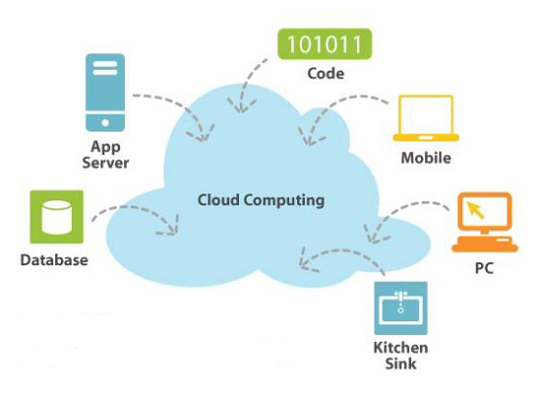
Cloud computing is the next stage in the Internet's evolution, providing the means through which everything — from computing power to computing infrastructure, applications, business processes to personal collaboration — can be delivered to you as a service wherever and whenever you need.

The "cloud" in cloud computing can be defined as the set of hardware, networks, storage, services, and interfaces that combine to deliver aspects of computing as a service. Cloud services include the delivery of software, infrastructure, and storage over the Internet (either as separate components or a complete platform) based on user demand.

Cloud computing has four essential characteristics: elasticity and the ability to scale up and down, self-service provisioning and automatic deprovisioning, application programming interfaces (APIs), billing and metering of service usage in a pay-as-you-go model. This flexibility is what is attracting individuals and businesses to move to the cloud.

The world of the cloud has lots of participants:

  • The end user who doesn't have to know anything about the underlying technology.

  • Business management who needs to take responsibility for the governance of data or services living in a cloud. Cloud service providers must provide a predictable and guaranteed service level and security to all their constituents.

  • The cloud service provider who is responsible for IT assets and maintenance.

image0.jpg

Cloud computing is offered in different forms: public clouds, private clouds, and hybrid clouds, which combine both public and private.

Cloud computing can completely change the way companies use technology to service customers, partners, and suppliers. Some businesses, such as Google and Amazon, already have most of their IT resources in the cloud. They have found that it can eliminate many of the complex constraints from the traditional computing environment, including space, time, power, and cost.


Read more...

Augmented reality

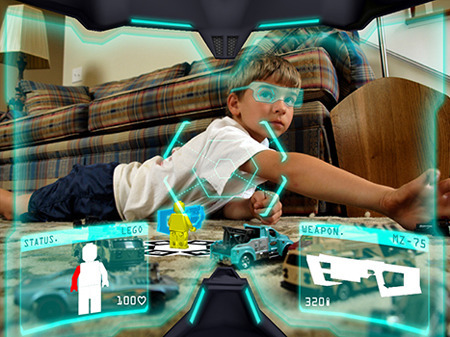
Augmented reality is one of the newest innovations in the electronics industry. It superimposes graphics, audio and other sense enhancements from computer screens onto real time environments. Augmented reality goes far beyond the static graphics technology of television where the graphics imposed do not change with the perspective. Augmented reality systems superimpose graphics for every perspective and adjust to every movement of the user's head and eyes.

Development of the needed technology for augmented reality systems, however, is still underway within the laboratories of both universities and high tech companies. It is forecasted that by the end of this decade, the first mass-produced augmented reality systems will hit the market.

Components of Augmented Reality

The three basic components of an augmented reality system are the head-mounted display, tracking system and mobile computer for the hardware. The goal of this new technology is to merge these three components into a highly portable unit much like a combination of a high tech walkman and an ordinary pair or eyeglasses.

The Head-Mounted Display

The head-mounted display used in augmented reality systems will enable the user to view superimposed graphics and text created by the system. As of today, the technology nearest to augmented reality head mounts is one that is being used in virtual reality applications.

There are two basic head mount design concepts that are being researched for augmented reality systems and these are the video see-through systems and optical see-through systems.

The video see-through systems block out the user's view of the outside environment and play the image real time through a camera mounted on the head gear. The main problem with this type of system is the delay in image adjustment whenever the user moves his head.

Optical see-through systems, on the other hand, make use of technology that "paints" the images directly onto the user's retina through rapid movement of the light source. Though this system has its drawbacks, particularly its high price, researchers are confident that this system will be a lot more portable and less inconspicuous for future augmented reality systems.

Tracking and Orientation

Another component of an augmented reality system is its tracking and orientation system. This system pinpoints the user's location in reference to his surroundings and additionally tracks the user's eye and head movements. The complicated procedure of tracking overall location, user movement and adjusting the displayed graphics needed are some of the major hurdles in developing this technology. So far, the best systems developed still presents a lag or a delay between the user's movement and the display of the image.

Portable Computeraugmented reality Augmented Reality

Last but not the least; augmented reality systems will need highly mobile computers. As of now, available mobile computers that can be used for this new technology are still not sufficiently powerful to create the needed stereo 3-D graphics. Graphics processing units like the NVidia GPU by Toshiba and ATI mobility 128 16MB-graphics chips are however being integrated into laptops to merge the current computer technology to augmented reality systems.

Applications of Augmented Reality Systems

The potential uses of augmented reality systems in everyday living and in various fields are many. Once available in the market, augmented reality systems will change the way people see and learn from their surroundings. Following are several applications for augmented reality systems.

Gaming and Entertainment

Augmented reality systems can be used to enhance gaming and entertainment. RPG games in the future can be integrated with augmented reality systems to give the user real environments as backdrops for his game and to make the user's senses perceive that he truly is one of the characters in the game. Sports fans will have access to up to date game information and enhancd sports viewing at home.

Education

Augmented reality systems in combination with other technologies such as WiFi could also be used to provide instant information to its users. For educational purposes, augmented reality systems can be used to view a panoramic recreation of a historical event superimposed on its real-time background. Students could use this system to have a deeper understanding on things like the formation of clouds, the structure of the universe and the galaxy, etc. through realistic and easily understandable augmented reality systems simulations.

Security and Defense

The military, particularly the Office of Naval Research and Defense Advanced Research Projects Agency or DARPA, are some of the original pioneers of augmented reality systems. One of the main uses of augmented reality systems to the military is providing field soldiers crucial information about their surroundings as well as friendly troops and enemy movements in their particular area. Augmented reality systems will also play a big role in law enforcing and intelligence agencies. This system will enable police officers to have a complete and detailed view and information about a crime scene, a patrol area, or a suspect line up.

Medicine

Medically, augmented reality systems could be used to give the surgeon a better sensory perception of the patient's body during an operation. This will result in less risky and more efficient surgical operations. The system could also be used in conjunction with other medical equipments such as an x-ray machine or an MRI to instantly give the doctors the information they need to make a medical diagnosis or decision.

Business

The building and construction field will benefit from the easier project management that augmented reality systems will bring. Markers can be placed or attached to a particular object a person is currently working on so that project and site managers can monitor work in progress. In the petroleum and mining industry, it will enable decision makers to make timely decisions. The management can decide about how ore will be mined by merely looking at the superimposition of field data fed by the geological survey team through the augmented reality systems.

Augmented reality systems can be used in almost any field or industry. The novelty of instant information coupled with enhanced perception will ensure that augmented reality systems will play a big role in how people live in the future.


Read more...

Senin, 21 Maret 2011

Games Freezing in Windows 7 - Tips to Reduce Windows 7 Game Freezing

Games require efficient system integrated with the best hardware and software. Although most new systems come with advanced specifications people still face gaming errors such as freezing problem especially with Windows 7 operating system. This happens due to the accumulation of junk data and poorly optimized system.
Here are some tips that will help you to fix games freezing in Windows 7 quickly.
· Update Graphic Drivers
· Install Latest Version of DirectX
· Fix Registry Problems
· Update Microsoft.NET Framework
· Delete Content from Game Cache
· Optimize Service
Update Graphic Drivers
Games freezing in Windows 7 issue appears if you haven't updated Windows graphic drivers. In order to fix the problem you have to update graphic drivers. You can download latest drivers from the manufacturer's website. Keep in mind that in case your Graphics Card does not meet the specifications required by the game, you may also need to change the card itself. It is always better to read the system requirements information provided with the game installation files.
Install Latest Version of DirectX
If you are using older version of DirectX and running latest games, it may cause games freezing in Windows 7. Download and install the updated version of DirectX from Microsoft's website.
Fix Registry Problems
Games freezing problem in Windows 7 also occurs due to junk entries in the Windows registry. These junk entries slow down the system performance which creates hurdles in running the games smoothly. You can remove junk files from registry by installing a good registry repairing tool.
Update Microsoft.NET Framework
Games freezing in Windows 7 can also be fixed by installing the latest version of Microsoft.NET Framework. To install latest version of Microsoft.NET Framework follow these steps
1. Open Internet Explorer
2. In Address Bar type http://www.microsoft.com and press Enter
3. Search for the latest version of Microsoft.NET Framework on Microsoft website
4. Download it and install it on your PC
5. Restart your PC
Delete Content from Game Cache
Cache continuously updates the most often used files, but if the cache is corrupted it can cause games freezing problem in Windows 7. You can fix this issue by removing the content from cache.
1. Open Console by pressing ~ key
2. Type the command PCB
3. Press Enter
If you are really tired of games freezing problem in Windows 7 and want to get rid of this issue quickly, Use a System Utilities software. It will fix the problem within few seconds. You can utilize the features such as registry cleaning, registry defrag and services optimizer to boost the system performance as well.
One good software for this purpose is RegInOut. Using RegInout Fix Game Freezing

Read more...

How Educational Games Online Benefit Your Children

The online safety of children has always been a controversial topic most especially among concerned parents. Should kids be allowed to use internet or should they be banned all together? How can they be monitored to make sure that the sites that they visit are safe? Considering the fact that the internet contains pretty much everything, these concerns are very much legitimate and understandable. Although, parents must realize that there are actually things in the internet that can help their children learn and have fun while they are at it. For instance, educational games online are available so that your children can have the time of their life while learning how to read, identify shapes and practice their logical thinking.
These are but some of the many benefits of educational games online for your children:
1. By playing educational games online, children will know the nice, satisfying feeling of actually accomplishing a goal. Let us say that they are playing Zuma, aside from the fact that they will learn how to match colors and have better motor skills by controlling the mouse, they will also know how great it feels to win if they work for it. Hence, they will learn that in order to succeed, work and skill are a necessary combination. Besides, it succeeding in their tasks will do wonders for their self confidence.
2. When your children are playing educational games online, they will not always win the first time around. That means that they have to try again in order to reach their goal. This will teach them the very important lesson of perseverance and not giving up to soon.
3. Yes, normal video games can be entertaining but let's face it, it deprives your child of the chance to mingle with other children. We all know that this is most important in order for him or her to learn to adapt to other people. It is vital for your child to develop interpersonal skills. What's great about playing educational games online is that your children can actually play and interact with other children. This is most beneficial to your child's social growth and development.
4. To bring meeting other kids to another level, there are educational games online that require children to team up in order to reach a certain goal. This is a great way for your child to recognize his strengths and weaknesses and to acknowledge that when people work together, they can do great things.
5. It is a proven fact that children who play educational games online have better motor control, particularly, of their eye and hand coordination. This is after all a basic skill that is important if they are to accomplish the goals of the game. This can be beneficial both online and in "real life" as some people choose to put it.
With proper parental supervision, kids can learn a lot while having loads of fun playing educational games online. Why not play with your child sometime and give it a shot?
Learn more about the positive aspects of Educational Games Online for children by visiting www.funeducationalgamesonline.com.

Read more...

Speed Up Internet Windows 7

I'm listing down the solutions that worked for many people to optimize internet speed. It is important that you are sure that your internet service provider is proving you enough bandwidth but still the internet speed lags.

1. Do not install third party extensions
2. Clean Temporary Files and Browser Cache
3. Properly Configure the System using an Internet Optimizer
4. Reset Internet Explorer Settings
5. Defragment the Registry

Do Not Install Third Party Extensions

Free third party software sometimes comes with browser extensions, such as, free toolbars and add-on objects. In many cases these do nothing but to slow up your browser.

To speed up Internet in Windows 7, do not choose to install such extensions and disable existing, if any.

1. Open Internet Explorer.
2. Click Tools | Manage Add-Ons.
3. Select a third party add-on listed in the right hand side.
4. Click Disable button.
5. Do the same for other add-ons, if any.

Clean Temporary Files and Browser Cache

Too many files stored on your disk, including temporary files and browser cache contents not only occupy a large amount of disk space but also reduce the internet performance.

In order to speed up internet (Windows 7), you have to clean these files using a disk cleaner application.

Here are the steps to do so using Internet Explorer settings:

1. Open Internet Explorer.
2. Click Tools | Delete Browsing History.
3. Click Delete button in the new dialog box to confirm the action.

Properly Configure the System using an Internet Optimizer

Using Optimizer software, set-up the system settings, including services, so that internet connection is optimized. This will speed up internet in Windows 7.

1. Download a System Utilities software.
2. Click Internet Optimizer tab.
3. Follow the instructions.

Reset Internet Explorer Settings

Try resetting the settings of Internet Explorer so as to speed up internet Windows 7. Steps are as follows:

1. Open Internet Explorer.
2. Click Tools | Internet Options.
3. Click Advanced | Reset.
4. Confirm you action by clicking Reset again.

Defragment the Registry

A Registry Defragmenter program may able to speed up internet Windows 7 by restructuring the registry. Download a System Utilities software which includes Registry Defragmenter tool and then defragment the registry.

Highly Recommended

It is recommended by experts to use a good internet/system optimizer tool instead. Such a system software can not only optimize your internet speed but it can also boost your computer speed.

Defragment the registry and speed up internet Windows 7 using good system utilities software such as RegInOut: http://www.reginout.com

Article Source: http://EzineArticles.com/?expert=Shane_Z


Read more...

Problems of Java 1723 Error in Windows 7

Java is most valuable software application, it is used by some of the biggest organizations. Many home users make use of this software application and some of them experience problems while installing Java software. Windows users experience problems while updating Java as well as installing it in the system. This type of problem also occurs while loading Java applets or Java codes from the Internet.

Several times Windows 7 displays 1723 error message when the user attempt to update Java or try to run Java enable internet website. This type of error is reported because of DLL file which is needed by Java in order to load Java executable file. Generally this type of error message reported by computer system because Java executable file is not available

Windows operating system shows error message in following format:

'Error 1723. There is a problem with this Windows Installer package. A DLL required for this install to complete could not be run. Contact your support personnel or package vendor.'

Causes of 1723 error

  • This problem may be reported due to damage in Java.
  • You may receive this type of error due to corruption in the system files.
  • Some important DLL files are missing from the system.
  • This error occurs due to corrupt or missing registry entries.
  • You may experience this error message due to spyware or virus infection.

Problems seen in the PC due to 1723 error

  • Due to emergence of this error blue screen error is displayed in the PC.
  • People experience "Not Responding" error while accessing the applications present in the system.
  • All the Windows platform system and internet browsers are affected due to this error.

Java is very important software application and there are many complications in installing and updating it. If you are experiencing error message like 1723 error while installing Java in your system then you need to fix it earliest to avoid severe system damage.

If this error is not fixed then the performance of the system will be degraded and may cause complete system crash. So, it is recommended to fix 1723 error as early as possible. You can make use of manual process to repair the registry settings but this process is very complicated as well as risky. In case you are not having technical knowledge then it is better not to use this process to fix this error. As it may lead to affect the system adversely.

To fix 1723 error without any complications you need to make use of automated tool. Since, in order to make use of this application you need not need to have any technical knowledge therefore it is safe to use it. To get detailed information on removing this application safely you need to visit following link http://www.1723errorfix.com

Article Source: http://EzineArticles.com/?expert=Cora_Lee_Jackson


Read more...

How to: Install and Run Android OS on Windows XP or Windows 7 (32 Bit Editions)

Android is an amazing Operating System for mobile devices especially smartphones but we all also know that Android is built on Linux platform and we have been installing and using Linux on our PCs for ages. Android is no different; Although it has been specifically developed for smartphones, a little trick can easily be applied to install and run Android on PCs running the Windows Operating System (Windows XP or Windows 7). Now you might ask why would one want to do so. There may be many possible reasons. Here are a few of them.

  1. You want to test your newly developed Android application and are looking for a testing platform.
  2. You want to visually feel the Android OS before buying and Android based smartphone for yourself or for your family or friends.

Here is what the developers of the Android x86 project for PC had to say.

This is a project to port Android open source project to x86 platform, formerly known as "patch hosting for android x86 support". The original plan is to host different patches for android x86 support from open source community. A few months after we created the project, we found out that we could do much more than just hosting patches. So we decide to create our code base to provide support on different x86 platforms, and set up a git server to host it.

Requirements

To Install Android OS on your Windows 32-Bit System, You'll need the following tools.

  1. Android 2.2 x86 Generic ISO (82.4 MB) - http://code.google.com/p/android-x86/downloads/detail?name=android-x86-2.2-generic.iso&can=2&q=
  2. MobaLiveCD Software (1564 KB) - http://mobalivecd.mobatek.net/en/
MobaLiveCD is a freeware that will run your Linux LiveCD on Windows thanks to the excellent emulator called "Qemu".
MobaLiveCD allows you to test your LiveCD with a single click: after downloading the ISO image file of your favorite LiveCD, you just have to start it in MobaLiveCD and here you are, without the need to burn a CD-Rom or to reboot your computer.

Installation Procedure

  1. Step 1: After downloading the Android 2.2 generic ISO and installing the MobaLiveCD tool, open the MobaLiveCD and click on the "Run Live CD" button.
  2. Step 2:Then select the ISO image that you downloaded. Do not forget to choose "Yes" when asked to create a hard disk image.
  3. Step 1: In the android Boot Menu that opens up, choose "Live CD - Run android-x86 without installation".
  4. Enjoy testing Android on Windows.

Thank you for reading this short tutorial on How to Install and Run Android on Windows PCs.

Sampath Amitash writes more such How-To tutorials on http://www.amitash.com/how-to and other articles on his website. Find more Tutorials, Software Reviews and Cool Internet Resources on http://www.amitash.com/

Article Source: http://EzineArticles.com/?expert=Sampath_Amitash


Read more...

Android Security - Tips for Keeping Your Android Based Devices Secure

Android based devices are the only devices that are holding their ground and gaining new adopters against Apple's seeming onslaught in the phone and tablet marketplace. People love the Apple iPhone and iPad for the beautiful design and ease of use and rightfully so. Users that prefer Android devices over Apple devices are often more independent types who like to tinker and prefer the openness of Android to the more tightly controlled and regulated Apple devices. If you are a fan of Android based devices and are considering purchasing one or already own one you now might be asking yourself how do I make sure it is secure?

When implementing security for Android based devices many of the general techniques that work for securing any type of mobile device is relevant and can be configured within Android.

Some of the general security risks you should be concerned about include:

  1. Securing your Android device from unauthorized use. This is best done by setting a screen lock to prevent friends, casual snoopers, or thieves from accessing your device without permission. I have seen many a friend pranked at the bar by leaving an unprotected device alone while going out for a smoke so to avoid having an embarrassing new Facebook status posted it is important to lock your device when it is not in use.
  2. Avoid prying eyes that know your location. Location based features on Android devices have many useful features and applications associated with them but if you desire privacy more then functionality it is important to turn these options off to prevent people from knowing more details about your location then you would want.
  3. Consider security when browsing the Internet. Internet browsing and email are the two most common methods that devices become infected with malware. It is important to configure your Android security settings to enable secure Internet browsing to prevent unwanted pop-ups and other nasty infections that could compromise the security of your device.
  4. Carefully consider which applications are worth installing and lean towards applications from vendors with a proven track record. It is important to remember that any one insecurely coded application that you install could compromise the security of your entire Android device.
  5. Promptly update your applications when new versions are available and consider implementing the auto-update feature to lower your chances of forgetting. Un-patched applications are a major source of insecurity and a frequent target of malware authors.

This is just an introduction to some of the information security risks you are exposed to by using an Android based device (and many of these risks also apply to any smart phone type device). It is important to be aware of the risks and take proper action to keep your device secure and in good operating condition.

Mark Kelly invites you to learn more about information security by visiting my Information Security Blog for more on how you can protect your home or business from a variety of information security threats.

Article Source: http://EzineArticles.com/?expert=Mark_T_Kelly


Read more...

iPad 2 - The Apple 2nd Generation Tablet

So Steve Jobs announced on 2nd March at a media event in San Francisco that the 2nd generation iPad called, following the company trend, iPad 2 will ship in the US from 11th March, and from 25th March all over the world.

The obvious question that comes to mind is: "Is it really worthy?" The first generation iPad came out less than year ago (it was April 2010), and it was a huge success, much bigger that everybody expected. Since then, all the big companies have been working hard to catch up with Apple, trying to come up with some better tablet solution. We've seen the Samsung Galaxy Pad, the Motorola Xoom, the HP TouchPad, the BlackBerry PlayBook and many many more, each one with its own pros and cons. The competition got fierce, the prices are aggressive and the performances grew. So Apple was forced to anticipate their next generation tablet to avoid losing precious market shares, and here we have it, the iPad 2, according to Jobs, faster, thinner and lighter than its predecessor.

It has a dual core processor, the old one had only a single core; the graphics performance are 9 times better than the old one; it comes with two cameras, one in the rear at 720p resolution, and one in the front at VGA resolution, where the original iPad had none; it has a gyroscope just like the iPhone 4. Those are pretty much the new features, everything else is the same, like the screen size and resolution (9,7" 1024x768), the storage sizes (16/32/64GB) and the connections. So yes, it still lacks a USB port, for some reason Apple doesn't think it's a good idea to put one, and they're right, as nobody really seems to care. The prices are the same as the old generation, the basic model, 16GB and no 3G, sells at $499, while the more accessorized one, 64GB and 3g connection, ships at $829.

No matter what the competition offers, more power, more connections, more resolution, more battery life, no tablet can come close to the Apple product, no other tablet has the same appeal as the iPad 2, and that is due to the incredible marketing work that Steve Jobs has done. All Apple products have become a status symbol, because they do exactly what they're supposed to, and they do it better than the rest. And not to mention, they're beautiful piece of hardware, and this 2nd generation iPad is no different.

To get all the information you need to decide if the Apple iPad 2 is for you, visit iPad 2 Generation

Article Source: http://EzineArticles.com/?expert=Paolo_Rosa


Read more...

Android 3.0 Honeycomb Review

With the iPad 2 out now how will the Android market fair and what have they got up there sleeves to compete with iPad.

Android 3.0 or Honeycomb, as it is now officially known, is coming soon to a tablet near you.

Google brings this new Android interface to a range of tablet computers. It includes a lot of cutting edge tech along with a holographic user interface system.

Honeycomb continues where the mobile phone Android os left off with enhanced multitasking, rich notifications, home screen customization, widgets, and more. But Honeycomb transforms the user interface with a vibrant, 3D experience and deeper interactivity, making them feel familiar but even better than before.

There will also be new apps written specifically for Honeycomb that make great use of the powerful graphics, additional media abilities, and better user engagement.

Two new "bars" are available. The "Systems" and "Application" bar. The "systems bar" is always present along the bottom. So if you are running an app the system bar will still be visible giving system information and updates (i.e incoming mail etc)

The "Application bar" is present while running an app. The "application bar" will give you navigation options, general options and will be a key point on the screen for accessing app information.

As with all android systems there is a choice of 5 custom home screens that give the users access to all the content of Honeycomb. All home screens have a grid orientation that allow placement for home screen widgets, app shortcuts, and wallpapers using a dedicated visual layout mode to be placed as wanted.

As with iPad and past versions of android there is an enhanced soft keyboard. The keys have been reshaped and repositioned for improved typing, and new keys have been added, such as a Tab key, to provide richer and more efficient text input. Users can touch-hold keys to access menus of special characters and switch text/voice input modes from a button in the System Bar.

Improved text selection, copy and paste
When entering or viewing text, a new UI lets users quickly select a word by press-hold and then adjust the selection area as needed by dragging a set of bounding arrows to new positions. Users can then select an action from the Action Bar, such as copy to the clipboard, share, paste, web search, or find.

New connectivity options
Android 3.0 includes new connectivity features that add useablility and convenience for users. Built-in support for cameras and MP3 lets users instantly sync media files with a USB-connected camera or desktop computer, without needing to mount a USB hardrive. Users can also connect full keyboards over either USB or Bluetooth.

Updated set of standard apps
Included in Honeycomb is a brand new browser. The new browser features that let users navigate and organize more efficiently. Multiple tabs replace browser windows and a new "incognito" mode allows anonymous browsing.

Email
The Email application uses a new two-pane interface to make viewing and organizing your mail much quicker. The app lets users select one or more messages, then select an action from the Action Bar, such as moving them to a folder. Users can sync attachments for later viewing and keep track of email using a home screen Widget.

Camera and Gallery
The Camera application has been redesigned to take advantage of a larger screen for quick access to exposure, focus, flash, zoom, front-facing camera, and more. To let users capture scenes in new ways, it adds built-in support for time-lapse video recording. The Gallery application lets users view albums and other collections in full-screen mode, with easy access to thumbnails for other photos in the collection.

If you found the review above useful and you want to know more about Android tablet Reviews visit us over at Android Tablet Expert.

Article Source: http://EzineArticles.com/?expert=Robert_S_Mills


Read more...

Laptop Repair and When It Cannot Help

The truth is there are some cases when laptop repair just will not save your computer. This is when it is time to say goodbye to old faithful, and hello to a new computer. Of course you want to get it fixed if it can be done, but there are some ways to tell if it cannot be fixed.

Liquid Foul

The first one reason for replacement that is surprisingly common is that a drink of some sort is spilled into the laptop. Laptop repair cannot get rid of fried insides. Drinks like soda or juice stick to every small part inside the computer. Even if it ran again, it would never be the same. There are a number of reasons this can happen; your roommate got tipsy and spilled beer in it, your girlfriend threw her soda at you and it landed on the laptop. It is a stroke of bad luck, but it happens to a lot of people.

Outdated Unit

Another reason it is time to replace your computer is if it is outdated. If it is really old, a laptop repair shop may not be able to fix it for you. You may have one that they have quit making parts for, or yours just will not be compatible with today's programs.

Did You Hear a Crunch?

The last reason to replace your laptop is another strange, but common one. If your laptop gets ran over then it is probably beyond laptop repair. There are different reasons that this happens as well. You may forget that you set it down, although who knows what possessed you to lay it in the driveway, or an angry girlfriend or boyfriend ran it over in spite. Throwing it against a wall would probably be another reason laptop repair would not help. No matter how mad you are, do not take it out on your laptop.

Laptops That Stand a Chance

The good things are that most other problems can be handled by a laptop repair shop. You can usually get your computer fixed if it has hardware or problems connecting to the internet. Taking your computer to the shop soaked, crushed, or from 1989 is not recommended, but any other issue should be taken in immediately forlaptop repair.

Use common sense when dealing with your laptop, you know when something is unfixable, and try not to leave it where it will get ran over.

Before you take a decision to buy a new laptop, it's better to consult a reputed laptop repair website. May be there is a chance to get your laptop problem rectified.

Esther A. is a Freelance SEO expert manager, who works with various companies to promote their businesses. Currently, she endeavours alongside a LaptopLCDRepair.Net to enhance the service's image.


Read more...

Top 10 Signals That Your Hard Drive Is About to Crash

Nothing lasts forever, including your computer's hard drive. Hard drives are mechanical devices and as such they will eventually wear out and stop working. When this happens you may lose any data stored on the drive, and if you don't have proper backups in place, there is no guarantee you can get that data back.

Fortunately, in many cases, your hard drive will begin to show signs of degradation before it fails completely. There are no guarantees, but this may give you time to properly back up your files and replace your hard drive before it dies completely.

Here are the top 10 signs of an impending hard drive failure:

1. Unusual grinding or clicking noises.

If you hear any unusual sounds coming from your computer, it may be a sign of mechanical damage within the hard disk. Often it's an indicator of damage to the read/write heads. If the read/write heads are damaged, they can come into contact with the disk platter, marring the surface and making it impossible to access your data.

2. Your computer locks up during booting.

Virtually all computers experience this problem on occasion, but if it happens regularly or becomes increasingly frequent, it is often a sign that there is a serious problem.

3. Files suddenly go missing for no apparent reason.

If files start to disappear and you're sure you haven't deleted them by mistake, it is likely a sign of hard drive failure. Sometimes the deleted files may not be important, but you may begin to lose important system files that could drastically affect the performance of your computer.

4. Incredibly long wait times to access your files.

Sometimes it takes a little bit longer to access your files than usual. This is normal and can be due to a variety of factors. However, if it routinely takes an extremely long time to access your files, this can be a sign that your hard drive has been compromised.

5. You get a message that your hard drive is not recognized by the system BIOS.

If you get an error message saying that your system BIOS (Basic Input Output System) can't access or doesn't recognize your hard drive, you have a problem. Another variation of this scenario is that the drive is identified as being a different make or model that it actually is. Either way, in all likelihood this means your drive is not working properly and needs to be replaced.

6. Your computer frequently locks up during the booting process.

Sometimes computers lock up during the booting process. In isolation, this is not necessarily an indication of a bigger problem. If it begins to happen on a regular basis, chances are that the drive is beginning to fail.

7. You get an error message saying that the hard drive is not formatted.

This is a sign that your hard drive is very close to complete failure. Occasionally you may be able to reboot your computer a couple of more times and get it to work, but this is a certain indication that you need to back up whatever files you can and replace the drive.

If you do get this error message, don't be fooled into trying to reformat the drive as this will cause you to lose all of your data.

8. You get an 'operating system not found' error.

This is an indication that your hard drive is severely damaged and is not working at all. If this happens, your computer can not detect the drive and you'll need a new hard drive as well as the services of a data recovery company to retrieve your lost files.

9. Your computer frequently reboots on its own.

If this happens occasionally, it may not indicate a bigger problem, but if your computer often reboots on its own during use this can be a sign that your drive is approaching the point of failure. If this problem starts to happen with increasing frequency, it's a very clear sign that there is a major problem.

10. The "Blue Screen of Death."

The dreaded "Blue Screen of Death" is more technically called a Stop Error Screen, and presents itself as a series of error messages on a bright blue background screen. A stop error screen can be a sign of any one of several computer malfunctions and most commonly indicates a problem with a device driver. However, it can also be a sign that your hard drive is near the end of the line.

If you see any of these signs, the best thing to do is to back up your files as soon as possible, with the most important files taking priority. Recognizing these signs and acting on them quickly gives you a better chance of saving your important files.

If your computer has already crashed, you may want to contact a reputable data recovery company. A data recovery specialist can recover lost files in many cases. The sooner you take action, the better chance that you can save your data.


Read more...

3 Reasons Why You Should Get an All-In-One Printer

With the increasing numbers of home based business. Printing of documents have become a chore for small businesses. To top it up, there is also copying and scanning that's need to be done.
The solution to this problem is getting an all-in-one printer. But most people has not bought it yet as there is a belief going around saying that the all-in-one printer, or AIO in short, easily spoil due to its mult-purpose ability.As most people said it is like telling a man to do more than one task thus this will tire the man out and in the end, he will not able to finish he's job perfectly.
This type of stereotyping has to be stopped and thus my best 3 reasons why you should get an all-in-one printer.
  1. Getting the all-in-one printer will save cost as there will be less equipment to maintain. If the user get an individual scanner, printer and faxing machine. The user will have to send each of the product for maintenance if either of them is spoil unless the user only uses an AIO printer then there will 2 less maintenance problem to deal with.
  2. For home based business, spaces are sacred. Problems with multiple office equipment is that it is bulky and take up a lot of space. And with current line of compact all-in-one printer, getting space for office equipments are no longer a problem.
  3. Getting an All-in-one printer will save money. With the multifunction printer it will be able to print, scan, faxing so there is no need to purchase office equipments one by one.
Sure non-users will say that an all-one-printer will not able to print the same quality as a regular printer but that is definitely wrong. The current all-in-one printers not only able to compare themselves to have the same printing or scanning quality as the individuals printer and scanner.
The multifunction printers also has wireless features and also additional fun features. For example, the Canon Pixma mx870(an all-in-one printer) has feature which users of iPad, iPhones can print images from their devices straight to the Pixma mx870.While the Pixma 495 is able to print still photographs from user captured HD movies.
Today's all in one printer are compact in size and also has additional features that most individual office equipments will not have for now. This is the time to get the all in one printer.

Read more...

Gnome Shell Vs Ubuntu Unity

When it comes to choose the next generation desktop environment, there is sheer war among the computer users, whether to pick GNOME Shell or Ubuntu Unity? Both of these operating systems are looming on the horizon and there are huge expectations from desktop environments. In this article we are going to discuss more about GNOME Shell and Ubuntu Unity. For operating system support, you can consult a PC repair company. There are plenty of them available in the market.
Let's start the discussion with GNOME Shell. Being the next generation of the GNOME Desktop Environment, GNOME Shell is a component of GNOME 3.0. It has been scheduled for release in April 2011. It replaces GNOME Panel and is integrated with Mutter which is a compositing window manager for X11.
On the other hand, Ubuntu Unity is a shell interface for the GNOME desktop environment. It has been developed by Canonical Ltd for the Ubuntu operating system and debuted in the netbook edition of Ubuntu 10.10. At first glance, Ubuntu Unity is going to be much more accessible to new users. This is because a new user might not be aware about the fact that to open up the launcher menu they need to hover their mouse in the upper left corner or click the Activities button. In Ubuntu Unity, the launchers are positioned right on the desktop.
You will find no run dialog in Ubuntu Unity. Most of the computer users used to use this dialog for launching applications for a very long time. Omission of this run dialog will definitely create a problem for them. On the contrary, on GNOME Shell you can have your run dialog!
Configuring the desktop is also very easy in the GNOME Shell. The users only need to right-click the desktop, the traditional way. But in order to configure Ubuntu Unity desktop, the user must click Applications, then System, and then Appearance. Even many will also find difficulties to find applications as they need to get to Systems from within Applications.
With both of these desktop environments you can't change your window manager. Whether you prefer Emerald over the standard window manager, either GNOME Shell or Ubuntu Unity, none allows you to perform the task. The Linux desktop are widely popular due to its flexibility. But those who are planning to use either GNOME Shell or Ubuntu Unity you will not be able to enjoy this flexibility.
So, from the discussion, it is clear that both of these desktop environments have some good and bad. Now, it's up to the users which one they will prefer.

Read more...

About Me

Foto Saya
rendezvous
Learn before his death
Lihat profil lengkapku

  ©Template by Dicas Blogger.